
Until recently, I did not pay much attention to voice privacy online. However, after joining more public Discord and gaming chats, I realized how important it is. Initially, I started joining online chats with my natural voice without considering anything. Eventually, I began to notice the fact that not every website is actually safe or comfortable to be on.
In some groups, too much personal questions are asked. With others, your voice is being heard, it is being remembered. Even it is being recognized in the next sessions. I began to feel a bit exposed when I was on new servers or when I met new people in public voice channels.
That is when I began to search for simple method to keep my own voice secret whilst still talking to others normally. I didn’t want something that requires learning or something too complicated. What I wanted was something that would work immediately.
This is how I got to try iTop Voicy and determine if it could work with voice anonymity during actual online conversations.
iTOP Voicy: A Real-Time AI Voice Changer
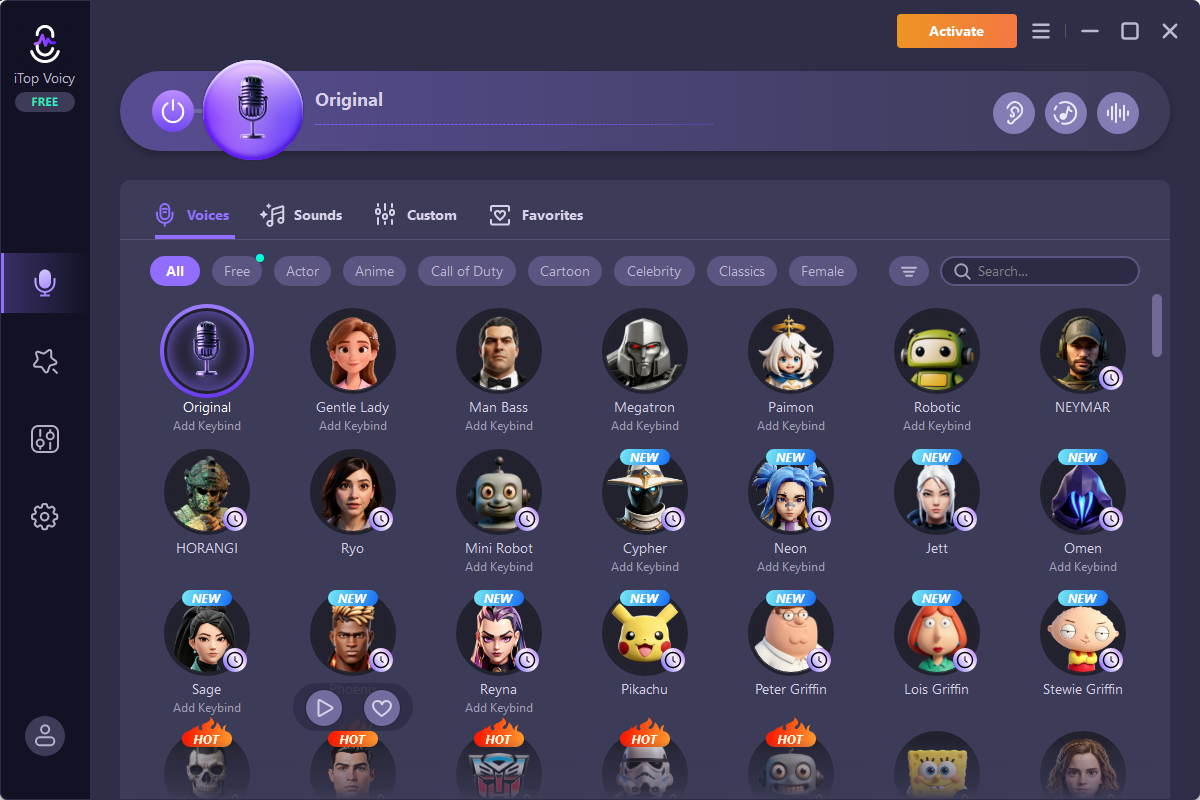
iTop Voicy is a real-time voice changer for PC that modifies your voice while you speak. Instead of recording audio or editing files later, it processes your microphone input instantly and sends the altered voice to apps like Discord, gaming chats, or streaming platforms.
Some of its key functions include:
- Real-time voice transformation
- AI-based voice effects
- Noise reduction for cleaner sound
- Soundboard support
- Custom voice settings
- Recording tools for voice clips
I mainly tested it in Discord voice channels and online gaming lobbies where I normally interact with strangers.
Why I Wanted to Try It for Online Privacy?
My main concern wasn’t about hiding completely, it was more about control.
I noticed that once people hear your real voice online, they sometimes start forming assumptions about your age, personality, or even location. In some cases, it can lead to unwanted attention.
I also had a few moments where I joined public voice chats but didn’t feel fully comfortable speaking naturally.
So my goal was simple:
- Reduce how recognizable my real voice is
- Stay comfortable in public chats
- Still communicate clearly without sounding robotic or unnatural
I wasn’t sure if a voice changer could really solve this, but I wanted to test it in real situations.
How I Set iTop Voicy Up for Online Chats?
Here is exactly how I configured it before using it in Discord and gaming chats.
Install and Open the Software
I installed the program from the official website and launched it. It took only a few minutes, and I didn’t need any extra tools.
Select My Microphone
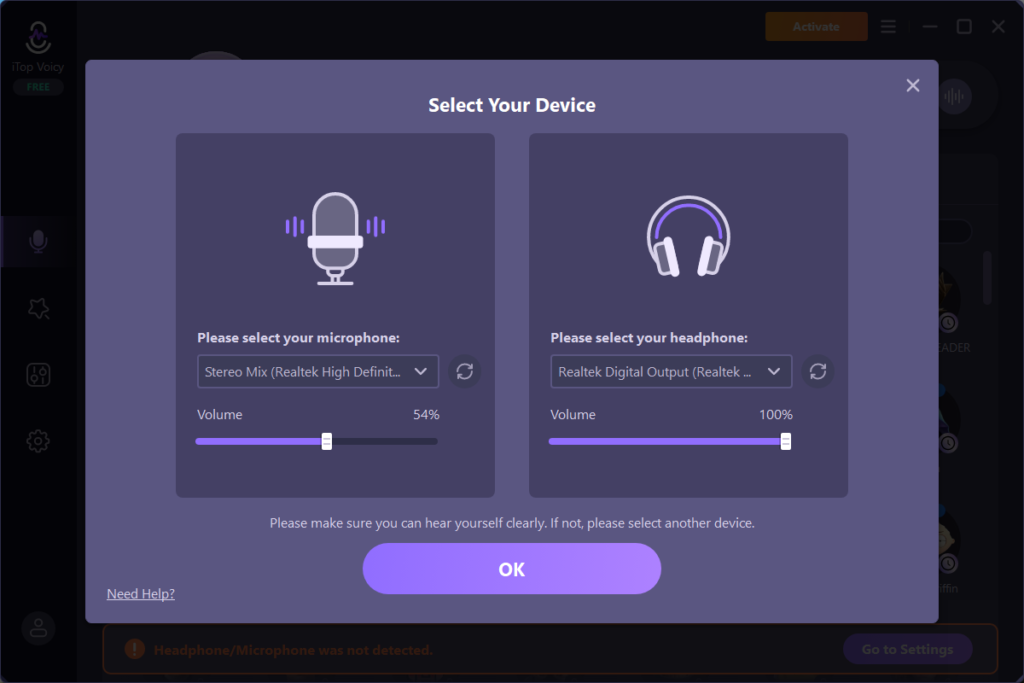
Inside the settings, I selected my microphone and tested my voice input. I spoke a few sentences to check clarity and adjusted the volume slightly so the output would not distort.
This step is important because if the base input is not clean, the modified voice won’t sound good either.
Choose a Voice Style
Next, I explored the voice effects library. I didn’t want anything too extreme because my goal was not to sound like a cartoon character. I just wanted some level of privacy.
I tested a few options and settled on more neutral tones that still changed my voice enough to make it less recognizable.
Connect It to Discord
Then I opened Discord and changed my input device to iTop Voicy. Once connected, I joined a voice channel to test it in real time.
The voice change worked instantly, which was the most important part for me.
Does It Actually Help With Anonymity?
This was the main question I wanted to answer during my test. What I noticed:
- My voice sounded different enough that people could not immediately recognize me
- Strangers in chat did not ask personal questions based on my real voice
- I felt more comfortable speaking in public channels
However, I also realized something important. It does not make you invisible. It just changes how you sound. So if someone already knows you well, they might still recognize patterns like speaking style or habits.
Core Features of iTop Voicy I Used During Testing
While testing anonymity in chats, these were the features I used most.
Real-Time Voice Changing
This was the core feature I relied on. As I spoke in Discord, my voice changed instantly without delay. This made conversations feel natural even while using effects.
There was no awkward lag, which is important in live communication.
AI Voice Effects
Some voice styles were more useful than others. I avoided extreme voices and focused on subtle changes that made my voice sound less familiar but still clear enough to understand.
This balance mattered a lot during long conversations.
Noise Reduction
I noticed background keyboard noise was reduced slightly. This helped keep my voice clearer during gaming chats, especially when I was typing while speaking.
Soundboard Tools
I tested the soundboard feature briefly during gaming sessions.
It added short audio clips during conversations, which made chats feel more interactive but wasn’t directly related to anonymity.
Pros and Cons Based on My Experience
After using it in real conversations, here’s my honest breakdown.
What I Liked
- Easy to set up and start using
- Real-time voice changes worked smoothly
- Helped reduce how recognizable my voice sounded
- Comfortable for long chat sessions
- Worked well with Discord and gaming apps
What I Didn’t Like
- Some voice effects sounded unnatural if pushed too far
- Not all voices work well with every microphone
- Doesn’t fully hide identity, only modifies voice
- Needs some testing to find the right settings
Final Thoughts
After testing iTop Voicy in real online chat situations, I can say it does help reduce how identifiable your voice sounds.
It didn’t completely hide my identity, but it made me feel more comfortable speaking in public voice channels. The real-time voice change worked well, and the setup was simple enough that I didn’t need to spend time learning complicated settings.
For me, the biggest benefit was not full anonymity, but the feeling of control over how I sound in online spaces.